Comprehensive Introduction to Rollei Filters for Rolleiflex and Rolleicord
If you are interested in buying some rolleiflex cameras or accessories,
Visit: DZP Camera Cafe
I have a good collection of Rollei filters, Bay I, Bay II and Bay III.
Sometimes the usage of the filters can be confusing. It is difficult to find a single source that could explain the application of all the filters. Hereby I compiled some information here from internet…
If I missed anything, please let me know. Thanks.

Rollei UV
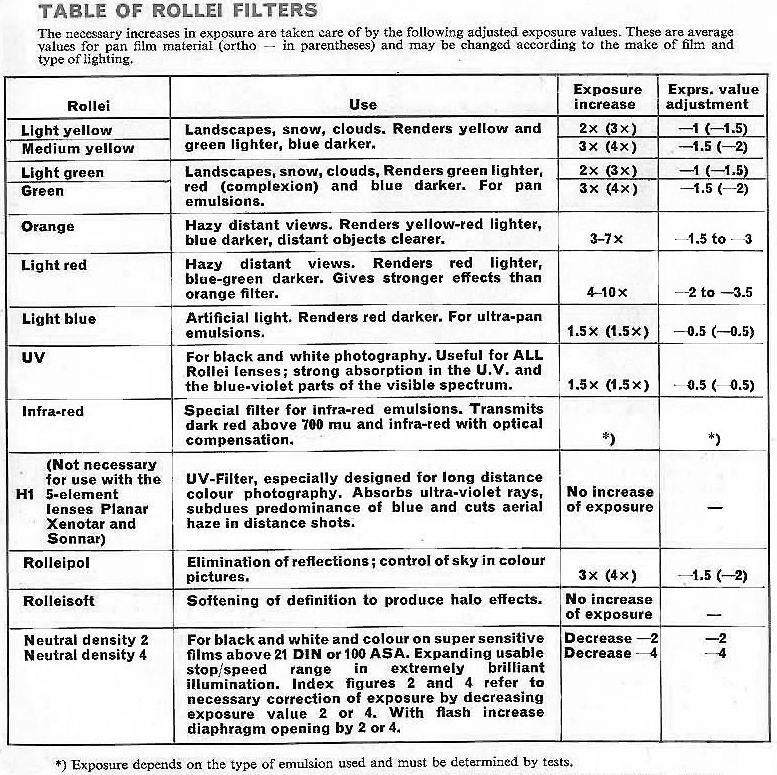
For B&W photography only, it does not work fine for color photography because it has a color tint, this filter has a strong effect to block UV rays, it’s very good for high mountain, snow, water surfaces, high and distant landscapes.
Rollei H1
It could be used for both Black and White and Color films. It is also an UV filter and Skylight filter for landscapes with haze, to eliminate the blue cast coming from the atmosphere, the UV filtering
is soft. It may not work fine for high mountain, snow, water surfaces, high and distant landscapes.
It can be used on Xenar and Tessar lenses;
Planar, Xenotar and Sonnar do not need it as the glasses to make these lenses have built in “similar material”
Rollei Orange
For hazy distant views. It renders yellow-red lighter, blue darker, distant objects clearer
Rollei Hellrot (Light Red)
It is used when distance view is hazy. It renders red lighter, blue-green darker. Gives stronger effects than orange filter.
Rollei R1
This color conversion filter has an UV filter effect and slight color warming effect for Tessar and Xenar lenses, it does not have UV filter effect for Xenotar, Planar and Sonnar but it has slight color warming effect for these lenses.
Rollei R2
It’s a bit stronger than R1 and has UV filter effect and
soft warming effect for every Rollei TLR lens.
Rollei R 1,5
This filter was manufactured from 1957, after R1, R2, R5 and R11 color conversions filters were no longer manufactured (1966), it would be equivalent regarding a Skylight 81 A or B filter.
Rolleinar 1, 2 and 3
Designed for: Close up shots at distances closer than 1 meter,
Use: With the two Rolleinar sets 1 and 2, the Rollei is converted for a focusing range from 39 1/2–17 3/4 (18 1/2) in. and 19 3/4 –12 1/8 (12 1/2) in., see page a. Each set is composed of two optically matched frontal lenses with different mounts. The Rolleinar with the thicker mount is for the viewing lens (Heidasmat) and contains a built-in prism for parallax correction. As a result the field of view in the ground glass coincides with the photograph even at very short distances. A red dot an the mount indicates the uppermost side of the lens for correct positioning in use.
The same instructions apply to the Rolleinars with bayonet size I (see page 2) using a separate Rolleipar parallax corrector for each set. Here too the Rolleipar is always attached to the viewing 1ens Rolleinar red dot up.
Focusing is accomplished as usual an the ground glass screen. The depth of field being rather limited at close range, considerable stopping down is advisable with Rolleinar lenses. The depth of field table indicates the most advantageous stops for the 25 1/4 X 2 1/4 – and 1 X 1 1/2 inch size.
The advantage of a large reproduction should not mislead to indiscriminate shortening of the camera-to-subject distance with close-ups, as this practice would entail danger of distortion. It is less great with objects having a shallow depth of field. For the same reason portrait heads should, if possible, not be taken at distances closer than 40 in.
Rolleinar Lenses require no increase of exposure.
To install: First attach the taking lens Rolleinar and then the viewing lens Rolleinar with prism in front. Insert into the inner bayonet and turn to the right until they click into position. The red dot on the viewing Rolleinar must be up.
Distances are measured from lens board to subject. The figures given in the tables are, for all practical purposes, usable with both 75 and 80 mm. lenses. Permissible circle at confusion = approx. 1/1000 of the focal length at 75 and 80 mm. respectively.
* Figures given in parenthesis apply to a focal length of 80 mm.
Rolleipol
Rolleipol can be used for both color and B&W films.
Purpose: Elimination or subduing al disturbing reflections (glare) from shiny, non-metallic objects or surfaces. Under certain conditions, filtering of the blue sky. Especially useful for regulation of the colors (colored reflections) and control of sky tone in color pictures.
Explanation: If the direction of movement of a light beam is imagined to be the axle of a wheel, then the spokes of the wheel correspond to the various plans of oscillation of the light waves (i.e., we are looking at the light beam in cross section). Polarization will reduce the many planes of osculation to merely one.
Polarization takes place when light waves, striking at a certain angle, are reflected by shiny bodies (with the exception of metals). This polarized segment of light can be retained in full or in part by placing the Rolleipol filter across the plane at oscillation: the reflections disappear. (The filter itself has a polarizing effect an the light which passes through it.) Further, since there is also polarized light in the blue sky, this can be eliminated: the use at the Rolleipol filter results in subdued (darkened) sky portions.
Not all reflected light is polarized. If reflections are to be eliminated, 1, the filter must be turned (an its optical axis) in the direction of the vibrations as required, and 2. the camera position must be changed to gain the best effect. This is attained when the beam of light striking the reflecting body and the line of camera view farm an angle at 60–74′, (varies according to material at the subject).
Application: 1. For eliminating or subduing disturbing reflections when photographing reflecting objects (polish, porcelain, painted and lacquered finishes, etc., — reproduction of textures and material), when photographing glass surfaces and the surface of water (the reflecting surfaces became transparent), 2. for filtering sky when photographing landscapes: the blue sky is darkened by absorption of the polarized light it captains. The effect may be observed in advance by looking through the filter. Light value correction about –1.5 = increase at exposure about 3 X.
For Use: Fasten the Rolleipol filter on finder lens (red dot at the top) and rotate the front ring of the Rolleipol until the desired effect is obtained on ground glass. Note the white number marking and transfer to the taking lens
Rollei – Hellblau (Light Blue Filter)
It is used for portraits in artificial lights: against too pale lips, filter for hypersensitized pan film with artificial lights.
Rolleisoft 0 and 1
Purpose: Softening of super-critical definition producing striking fluffy halo-effects, especially with back-lighting.
Explanation: The taking lens Of the Rollei gives super-critical definition required for the majority of exposures. If, occasionally, softer definition is desired (e. 9. for portraits and certain dramatic effects) this is obtained by attaching the Rolleisoft Soft Focus Lens in front of the lens.
The Rolleisoft lens consists at a plane parallel glass disc with a few concentric ground-in grooves. While otherwise the lens permits only sharpness or softness through adjustment of the focus, the Rolleisoft lens obtains both simultaneously: Between these grooves the rays of light pass unimpeded to the film and produce a sharp impression, i. e., the basis of the image. At the grooves, however, the light rays are diverted with the result that an additional image of slightly softer definition is superimposed. Both together produce the soft focus effect: The exposure shows fluffy softened contours and sunny halo-lights; distracting fine details recede and the fatal impression of depth definition is improved. By means of the Rolleisoft the Rollei-lens becomes a soft focus lens.
Application: Best results are obtained by using the entire surface of Rolleisoft, i. e., with full aperture. With Rolleisoft 1 (with increased number Of grooves) it is permissible to stop down to f: 5.6. Smaller apertures tend to decrease the soft focus effect.
Rolleisoft 0 is used for weak soft faces effect: primarily for strong contrasts of light and glittering objects, i. e., chiefly for backlighted subjects. Rolleisoft t is used for greater soft focus effect: for soft lighting. — Chief field at application generally: portraiture. Best suited tar: contrasting, highlighted subjects. Rolleisoft increases the plastic, sunny character of backlighted pictures. Speed and focal length remain unchanged. Generous exposures increase the halo-effect. The ground glass screen shows full focused sharpness when using Rolleisoft lenses. The Rolleisoft effect can be judged at any time an the ground glass screen by placing the Rolleisoft in front of the finder lens.
For Use: Fasten Rolleisoft to inner bayonet at the taking lens.
Rollei Grun (Green Filter)
It is for B&W photography only. Not for Color films.
A green filter renders yellow-green brighter, red and blue darker. A deeper filter increase this effect. Chief advantage when taking landscapes: brightens foliage, darkens sky for strong rendition of cloud formations, darkens red roofs. Improve detail of blue snow-shadows. For daylight portraits: deeper skin tones, darker red lips – at the same time full UV filter effect – when used with orthochromatic films, the rendition of the red colors will not be influenced.
Rollei Gelb-Mittel (Medium yellow) -1.5
Medium yellow filter often is used for b/w outdoor photography to provide contrast between clouds and sky. Filter facter -1.5 = -2/3 stop correction. When metering, set your handheld meters for film 2/3 stop slower than loaded, e.g. 100 speed to 64.
You also can use it with color film to simulate late afternoon, though you need to experiment a bit.
Rollei Infrarot (Infra-red) filter
It is a special filter for infra-red emulsions. It transmits dark red above 700mu and infra-red with optical compensation. You can only use it with infra-red film, which is expensive and hard to find.
Visually, this filter looks opaque.
Rollei ND filter – ND2 and ND4
It is used for black and white and color on super sensitive films above 100ASA. Expanding usable stop/speed range in extremely brilliant illumination. Index figures 2 and 4 refers to necessary correction of exposure by decreasing exposure value 2 or 4, or with flash increase diagram by 2 or 4.




Q & A: How to clean shutter?
Yes, I know the rule is never to lubricate shutter blades, and I haven’t. I acquired an old Zeiss Ikonta which had that common ailment, sticky slow shutter speeds on a Prontor-SV shutter. So I tipped in a small amount of lighter fuel, which normally does the trick, exercising the shutter a few dozen times, and it seemed to free up, with 1s sounding like 1 second, and so on. It seemed perfect. But after an hour or so, the shutter just stuck completely, and a few more drops of lighter fuel freed it up. Then the cycle repeats. I’m wondering if the lighter fuel is reaching the blades and acting as a lubricant, and when it dries out, the blades are causing the shutter to stick, rather than any gunge in the shutter assembly itself. I’m not sure.
I know there’s a tip elsewhere on this forum that if it’s absolutely necessary, shutter blades can be gently lubricated by a finger smeared lightly in fine graphite pencil, but I’m hesitant about this in case I’m on the wrong lines entirely.
I’d be grateful for any pointers. This little Ikonta 521 is otherwise a perfect little peach and I’m getting restless now about putting a roll of film through it.
————–
What you’re experiencing is very common. Most of us have come across it an one time or another. What has happened is that the original sticky slow speeds were caused by dirt/dried oil in the slow speed escapement train. When you used the lighter fuel you freed this, but the old oil on it has washed down and distributed itself on the shutter blades. When you add more lighter fuel you dilute this oil enough to break down its surface tension but it reforms as soon as the lighter fuel dries out. It’s got to be washed out completely – adding graphite or anything else will only form a sticky paste.
You don’t say how far you disassembled the shutter, but it’s best if you take it off the camera (usually a screwed ring round the shutter housing inside the camera), remove both the front and rear lens elements and take off the speed control plate so that you can see all the mechanism.
Then there are two ways of getting it clean, the long way, which purists will tell you is the ‘proper’ way, and the short way which, for me, works about 90% of the time. Try the short way first.
Lay the shutter in a shallow plastic tray, something like a ‘chinese take-away’ box, keep flooding it with lighter fuel and working it while it’s wet to try to wash all the old oil out. Keep doing this until the shutter works when it’s dried out.
Lighter fuel in small cans is quite expensive but it’s only refined naptha. If you can buy ‘commercial grade’ naptha it’s cheap enough to cover the shutter with it and swirl thigs around. On really sticky shutters, as an alternative to naptha or lighter fuel, I have used an aerosol of carburettor/injector cleaner from my local auto store. It’s a very powerful degreaser, two floodings are usually enough to get the shutter really clean, but be careful how you use it. ALWAYS use it in the open or in a ventilated outhouse because the fumes are nasty things to breathe. Second, don’t use it if there are any plastic bits attached to the shutter because some of these injector cleaners will dissolve many plastics.
With regard to operating the shutter while it’s still wet with cleaner, the shutter should work in ‘B’ mode with the speed plate off, or you can put the plate back on and just hold it in position while you work the other speeds. A tip for replacing the speed plate – put it on in approximately the correct position then give it a gentle turn anticlockwise till you hear a click as the pins drop into their respective slots.
If this is the first time you’ve been inside a leaf shutter have a look at Daniel Mitchel’s site
http://daniel.mitchell.name/cameras/index.html
and scroll down the index on the left till you come to ‘shutters’ and have a look at ‘Prontor SVS’, which is an updated version of your Prontor SV.Daniel gives a detailed, illustrated, blow-by-blow account of stripping a Prontor completely to pieces for cleaning (the ‘long way’).
 TLRgraphy